Best Way to Make a Karaoke Track from Any Song (2025 Guide)
Most karaoke apps never have the song you actually want to sing. The popular ones? Sure. But that deep cut from your favorite artist? Forget it.
The solution is simpler than you think: make your own karaoke tracks. You don't need expensive software or audio engineering skills — just the right tool.
TL;DR: The fastest way to make a karaoke track is uploading your song to an AI vocal remover like StemSplit, selecting "Instrumental Only," and downloading in under 60 seconds. You get a free 30-second preview before paying — no account required.
Table of Contents
- What Is a Karaoke Track?
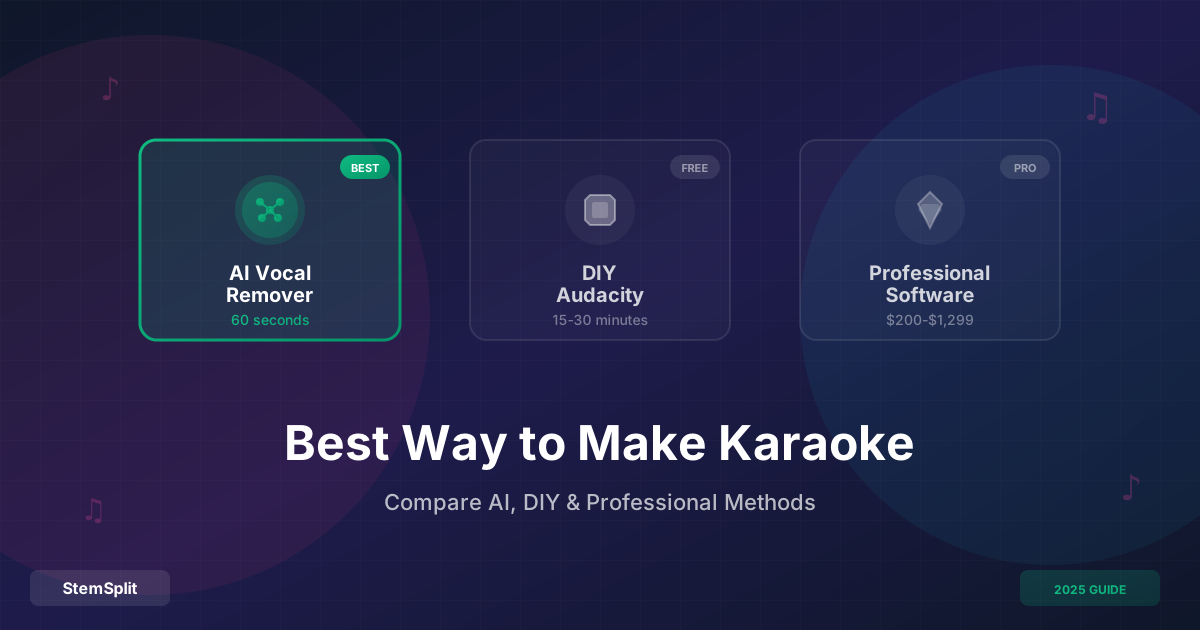
- Method 1: AI Vocal Remover (Fastest)
- Method 2: DIY with Audacity (Free but Limited)
- Method 3: Professional Software (Overkill for Most)
- Which Method Should You Choose?
- Tips for Better Karaoke Tracks
- FAQ
- The Bottom Line
What Is a Karaoke Track?
A karaoke track is an instrumental version of a song with the vocals removed. It's also called a "backing track" or "minus one track" — basically everything except the lead vocals.
Professional karaoke tracks are mixed specifically for singing. But for most people, a clean vocal-free instrumental works perfectly fine. Modern AI can separate vocals from music with 95%+ accuracy, making DIY karaoke creation surprisingly easy.
Method 1: AI Vocal Remover (Fastest)
Best for: Anyone who wants quality results in under a minute.
AI-powered vocal removers use neural networks to separate vocals from instrumentals. Upload your song, wait about 60 seconds, and download your karaoke track.
How It Works
- Upload your audio file (MP3, WAV, FLAC, etc.)
- Select "Instrumental Only" as your output type
- Preview the results to check quality
- Download your karaoke track
StemSplit's vocal remover processes tracks in under 60 seconds and offers a free 30-second preview before you pay. No subscription required — credits never expire.
Pros
- Fast (60 seconds or less)
- No technical knowledge needed
- Works with any song
- High quality output (95%+ accuracy)
- Try before you buy with free preview
Cons
- Not completely free (though preview is)
- Rare songs with unusual mixes might have artifacts
Cost
Pay-as-you-go pricing starts at $0.10 per minute of audio. A 3-minute song costs about $0.30. Credits never expire, so you're not locked into a subscription.
Want to try this yourself? StemSplit lets you preview any song free — no account needed. Create your first karaoke track →
Method 2: DIY with Audacity (Free but Limited)
Best for: People comfortable with audio editing who don't mind trial and error.
Audacity is free, open-source audio software. It includes a vocal reduction effect that inverts one stereo channel to cancel out center-panned audio (usually vocals).
How It Works
- Download and install Audacity
- Import your song (File → Open)
- Select the entire track (Ctrl/Cmd + A)
- Apply vocal reduction (Effect → Vocal Reduction and Isolation)
- Choose "Remove Vocals" and click OK
- Export your track (File → Export → Export as MP3)
Pros
- Completely free
- Works offline
- No file size limits
Cons
- Quality is hit-or-miss — depends entirely on how the song was mixed
- Only removes center-panned vocals
- Background vocals often remain
- Can damage instrumental clarity
- Requires learning audio software
- Time-consuming (15-30 minutes per track)
When It Works Well
- Songs with vocals panned dead center
- Simple instrumental arrangements
- Older recordings with clear stereo separation
When It Fails
- Modern songs with wide stereo vocals
- Tracks with heavy reverb or effects
- Songs where vocals share frequency range with instruments
- Anything mixed with modern "wide" vocal techniques
According to the Audio Engineering Society, phase-cancellation techniques like Audacity's vocal removal only work on about 40-50% of modern recordings. AI-based methods achieve 95%+ success rates.
Method 3: Professional Software (Overkill for Most)
Best for: Audio engineers, producers, or people who need karaoke tracks daily.
Professional DAWs (Digital Audio Workstations) like Pro Tools, Logic Pro, or Ableton Live offer advanced stem separation plugins. These require paid software ($200-$600) plus additional plugins.
Popular Professional Options
| Software | Cost | Learning Curve |
|---|---|---|
| iZotope RX | $399-$1,299 | High |
| Steinberg SpectraLayers | $399 | High |
| Logic Pro + plugins | $200+ | Medium-High |
| Pro Tools + plugins | $600+/year | High |
Pros
- Professional-grade results
- Full control over the process
- Can edit individual stems
- Useful if you already own the software
Cons
- Expensive ($200-$1,299 upfront)
- Steep learning curve
- Overkill if you just need occasional karaoke tracks
- Takes 30-60 minutes per track once you know what you're doing
When It Makes Sense
- You're already a music producer with existing software
- You need karaoke tracks regularly (multiple per day)
- You want to edit stems beyond just removal
- You're producing karaoke tracks commercially
For occasional use, the cost-per-track is absurdly high. A $400 plugin needs to create 1,333 tracks at $0.30/track (AI pricing) just to break even.
Which Method Should You Choose?
| Your Situation | Best Method |
|---|---|
| Need one karaoke track now | AI vocal remover |
| Want it free, don't care about quality | Audacity (DIY) |
| Need 10+ tracks per week | Professional software |
| Want the best quality-to-effort ratio | AI vocal remover |
| Already own Pro Tools/Logic | Try professional plugins |
For 95% of people: AI vocal removal is the sweet spot. It's fast, affordable, and produces professional-quality results without technical knowledge.
Tips for Better Karaoke Tracks
Start with High-Quality Source Files
Your output quality depends on your input. Use the highest quality file you can find:
- Best: Purchased FLAC or WAV (lossless)
- Good: 320kbps MP3
- Okay: 192-256kbps MP3
- Bad: YouTube rips (usually 128kbps)
The official FLAC specification preserves every detail from the original recording, giving AI more information to work with.
Choose the Right Output Format
| Format | When to Use |
|---|---|
| MP3 (320kbps) | Playing on most devices, sharing |
| WAV | Burning to CD, professional use |
| FLAC | Archival, maximum quality |
For karaoke night at home, 320kbps MP3 is perfect. It's high quality but won't take up massive storage space.
Test Before Committing
Always preview your karaoke track before finalizing. Listen for:
- Remaining vocal fragments
- Distortion or artifacts
- Damaged instrumental sections
- Overall balance
With StemSplit's free preview, you hear 30 seconds before paying — so you know exactly what you're getting.
Keep Backing Vocals
Some vocal removers have options to keep or remove backing vocals. For karaoke:
- Remove backing vocals for solo practice
- Keep backing vocals for a fuller sound
FAQ
What's the difference between karaoke and instrumental tracks?
Karaoke tracks and instrumentals are essentially the same — both remove lead vocals. Professional karaoke tracks are specifically mixed for singing and often include on-screen lyrics, but for home use, a clean instrumental works perfectly.
Can I make karaoke tracks from any song?
Yes, with AI vocal removal you can create karaoke tracks from any song you own. Quality depends on the source file — well-produced studio tracks separate cleanly. Live recordings or songs with heavy vocal effects may have artifacts.
How long does it take to make a karaoke track?
With AI vocal removal: under 60 seconds. With Audacity: 15-30 minutes. With professional software: 30-60 minutes once you know what you're doing.
Is it legal to make karaoke tracks from songs I own?
Creating karaoke tracks from songs you own for personal use falls under fair use in most jurisdictions. However, distributing or publicly performing those tracks may require licenses. Check your local copyright laws if using commercially.
Why do some karaoke tracks sound better than others?
Output quality depends on three factors: source file quality, the separation method used, and how the original song was mixed. Songs with clearly separated vocals and instruments produce cleaner karaoke tracks. AI methods generally produce better results than phase-cancellation techniques.
Can I create karaoke tracks on my phone?
Yes, several AI vocal removers work on mobile devices through web browsers. Upload your song, process it, and download directly to your phone. No app installation required.
What if my karaoke track still has some vocals?
Perfect vocal removal is difficult with songs where vocals share frequency ranges with instruments. Try starting with a higher quality source file, or use a 4-stem separator to isolate vocals, drums, bass, and other instruments separately for more control.
The Bottom Line
Making karaoke tracks in 2025 doesn't require expensive software or audio engineering skills. AI vocal removers have democratized what used to be a complex process.
The verdict: Unless you're an audio engineer with existing professional software, AI vocal removal is the fastest, easiest, and most cost-effective method. Upload a song, wait 60 seconds, and you've got a karaoke track.
The DIY Audacity method is free but produces inconsistent results. Professional software is overkill unless you're creating karaoke tracks daily.
Your Karaoke Track Is 60 Seconds Away
Stop searching for karaoke versions that don't exist. Create them yourself from any song you own.
- ✅ Free 30-second preview
- ✅ No account required
- ✅ Results in under 60 seconds
- ✅ Credits never expire